Buying a laptop is an investment, so it is important to look beyond the price or specifications written on the product listing. A laptop that looks like a good deal may not necessarily be the right choice for your needs.
Here are some common laptop-buying mistakes you should avoid before making your purchase.
1. Choosing a Laptop Only Because It Is Cheap
One common mistake is choosing a laptop simply because it has the lowest price.
While staying within your budget is important, buying an extremely cheap laptop that cannot handle your daily activities may cost you more in the long run. You may experience slow performance, limited storage, poor battery life, or frequent repairs.
Instead of focusing only on price, consider the laptop’s specifications, condition, reliability, warranty, and whether it can comfortably handle what you need it for.
2. Looking Only at Core i5 or Core i7
Seeing “Core i7” does not automatically mean you are getting a better laptop.
The processor generation and exact model also matter. An older-generation Core i7 should not automatically be considered better than a much newer Core i5 simply because of the name.
Always check the processor model and generation when comparing laptops.
3. Buying More Performance Than You Actually Need
The opposite mistake is paying for specifications that are far beyond your actual requirements.
If you mainly browse the internet, work with Microsoft Office, attend online meetings, and watch videos, you may not need 32GB RAM, a high-end processor, or an expensive dedicated graphics card.
Choose specifications based on your workload. This allows you to spend your budget on features that will actually improve your experience.
4. Choosing an HDD When You Could Get an SSD
Storage capacity is important, but storage type matters too.
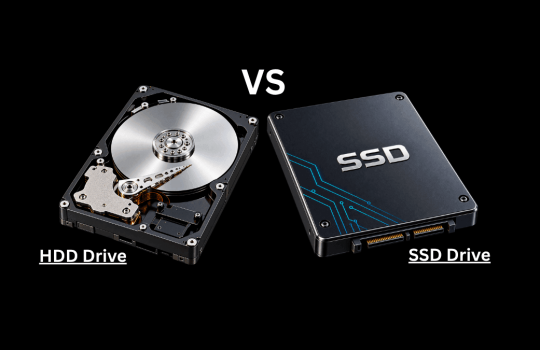
A laptop with an SSD will generally start faster, open applications more quickly, and feel more responsive than a similar laptop using a traditional HDD.
Don’t choose a 1TB HDD simply because it offers more storage without considering whether a 512GB SSD may provide a much better everyday experience.
5. Ignoring RAM and Storage Upgradeability
Your needs may change over time.
Before buying, check whether the laptop allows you to upgrade the RAM or storage. Some modern laptops have RAM soldered directly to the motherboard, which means it cannot be upgraded later.
Knowing this before buying can help you choose specifications that will remain useful for longer.
6. Choosing a Laptop Based Only on Appearance
A thin, attractive laptop may look impressive, but design should not be your only consideration.
Check its performance, cooling, keyboard, screen, ports, battery life, build quality, and repairability. A laptop should not only look good; it should also perform reliably for your intended use.
7. Ignoring Battery Condition on a Used Laptop
If you are buying a UK-used or refurbished laptop, don’t assume the battery will perform like a brand-new one.
Ask about the battery health and expected backup time. Where possible, test the battery before completing your purchase.
Battery condition is particularly important for students, travellers, remote workers, and professionals who frequently work away from a power outlet.
8. Forgetting to Check the Ports
Before buying, think about the devices you normally connect to your laptop.
Do you need HDMI for an external monitor or projector? Do you use USB-A accessories? Do you need USB-C, an Ethernet port, a headphone jack, or a memory card reader?
Checking the available ports beforehand can save you from constantly relying on additional adapters.
9. Ignoring Warranty and After-Sales Support
A laptop can develop a problem regardless of how good its specifications are.
This makes warranty and after-sales support important, particularly when buying a refurbished laptop. Before paying, understand what the warranty covers, how long it lasts, and what support is available if something goes wrong.
A slightly cheaper laptop without reliable support may not always be the better deal.
10. Buying Before Checking Software Compatibility
Finally, make sure the laptop can run the applications you need.
Students, engineers, designers, developers, video editors, accountants, and other professionals may depend on specific software with particular hardware or operating-system requirements.
Checking those requirements before buying can prevent an expensive mistake.
Make Your Decision Based on Your Actual Needs
The best laptop isn’t necessarily the cheapest, the most expensive, or the one with the highest specifications.
It is the laptop that gives you the right balance of performance, reliability, portability, features, upgradeability, and value within your budget.
Before paying, take a few minutes to compare your needs with the laptop’s specifications and condition. That simple step can help you avoid buying the wrong laptop and give you better value for your money.